


Hypernatural: AI Video Stories
4.7109.00 Reviews
App Specs
- Version
- 250722
- Updated On
- License
- Free
- Downloads
- 100,000+
- Developer
- Hypernatural
- Categories
- Video Players & Editors
- Platform
- Android
Screenshots
 Analysis by AppCompare
I reach for an AI video maker when I have a handful of photos or clips and a clear idea, but not the time or patience to build a polished edit from scratch. Hypernatural: AI Video Stories is aimed at that moment: it turns supplied material into short, story-led videos, with the app making many of the creative decisions along the way. I find that appealing for quick personal projects, though it is a different kind of tool from a full manual editor.
Exploring the Magic of Hypernatural
Hypernatural is a free video-making app from Hypernatural, in the video players and editors category. It has a 4.7 average from around 7,900 ratings, and more than 100,000 installs. It is rated for everyone and was released on May 8, 2024; its current version is 250722, with Android 9 as the minimum operating system. In-app purchases range from $18.99 to $264.99 per item, so I would check the available options in the app before committing to a paid workflow.
Getting Started: The User Experience
First things first, downloading and setting up the app is a breeze. Just head over to your respective app store, search for it, and hit download. Once you've got it on your device, you're greeted with a sleek, user-friendly interface. It's intuitive, so even if you're not a tech wizard, you'll find your way around in no time.
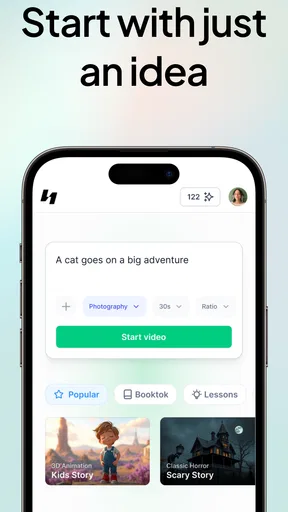
Creating your first video story is as simple as tapping on a few options. The app guides you through the process like a friendly tour guide. You select your theme, upload your footage or images, and let the AI do its magic. It’s like having a personal movie director right in your pocket.
The AI Magic: Features and Functionality
Now, let’s talk features. The app boasts an impressive array of themes and templates to choose from. Whether you're looking to create a travel montage, a personal vlog, or even a quirky birthday message, there’s something for every occasion. The AI analyzes your input and suggests the best edits, filters, and effects to enhance your story.
One of the standout features for me is the app’s ability to auto-generate music that fits the mood of your video. This little touch really amps up the emotional impact of your stories. Plus, you can tweak the pacing and transitions with just a few taps, giving you creative control without overwhelming you with options.
Making a Story That Feels Like Yours
The most useful way I’ve found to approach an AI-led edit is to think about the story before choosing a template. For a short trip recap, I would sort the strongest moments into a rough beginning, middle, and end: arriving, the best activity, then a closing view or group shot. That small bit of preparation gives the app a more coherent selection to work with and makes its suggested pacing easier to judge.
Worth Reading Before You Choose

EA SPORTS FC Mobile 26 Is a Bigger Football Game, but It Takes Time

Flipboard Shows What News Apps Must Do Beyond the Feed

Switching to Android Auto Means Rethinking Your Driving Routine

Google Calendar Makes a Crowded Week Easier to Manage

Ludo King Makes the Most of the Minutes Between Plans

Baby Panda World Brings Quick Play to Modern Phones, but Its Game Library Feels Busy
I would also avoid feeding it every photo from an event at once. A large, mixed batch can make it harder to keep the result focused, even when the app assembles the material quickly. Selecting a few images that clearly belong together is a practical trade-off: less variety, but a better chance that the finished story has a point rather than feeling like a camera roll set to music.
When the first cut is close but not quite right, I’d adjust the order and pacing before spending time changing decorative choices. A transition cannot fix a weak sequence, whereas moving one key moment earlier can make the whole clip easier to follow. This is where a few simple controls matter: they let me keep the convenience of automated editing while correcting the choices that affect the story most.
Everyday Uses and Who Will Get the Most From It
A realistic use is making a quick recap after a family gathering. I might choose a small set of candid photos, a short clip of the cake being brought out, and one group picture, then let Hypernatural shape them into something I can share with relatives. That is a better fit than opening a complex editor, building a timeline, and deciding every cut manually when the goal is simply to preserve the mood of the afternoon.
The app also makes sense for someone who posts occasional social videos but does not want editing to become a hobby in itself. A small shop owner, for example, could assemble a brief product or behind-the-scenes story from existing images when a polished, quickly made post is more useful than a highly customized campaign. I would still review every scene before sharing: automated choices can make a clip feel finished without ensuring that each image communicates exactly what I intended.
People who already enjoy editing may find the same automation restrictive. If I needed exact control over every cut, detailed audio mixing, or a carefully matched brand style, I would choose a conventional timeline editor instead. Hypernatural is most persuasive when speed and an attractive starting point matter more than granular control.
Unleashing Creativity: User Engagement
What I love about this app is how it encourages creativity. It’s not just about making videos; it’s about crafting stories that resonate. The community aspect is also pretty rad. You can share your creations within the app and get feedback from other users. It’s a neat way to connect with fellow storytellers and even pick up a tip or two.
For those who are competitive, the app occasionally hosts themed challenges. It’s a fun way to test your skills and see how your stories stack up against others. And who doesn’t love a bit of friendly competition?
Where the Automation Helps—and Where It Can Get in the Way
Compared with a standard mobile editor, Hypernatural puts more emphasis on an assisted, story-first result than on constructing a timeline from individual clips. That lowers the effort needed to get from raw material to a shareable video, especially if the user is unsure how to pace a montage. The trade-off is that the app’s interpretation may not match the exact emphasis I had in mind; its suggestions are a starting point, not a substitute for reviewing the finished sequence.
Compared with simply posting a collection of photos, an assembled video can give a memory a clearer rhythm and a music-led mood. But it is not always the right format. If the important thing is to preserve a long conversation, show an uninterrupted demonstration, or keep original sound prominent, I would use a more direct recording or editing workflow. An AI-generated montage is strongest when selected moments matter more than complete documentation.
One practical habit is to keep an untouched copy of the original photos and clips before experimenting. That gives me room to try a different theme or sequence without worrying that the source material is lost. I would also watch the result once with the sound on and once with it muted: music can make transitions feel natural, while a silent pass reveals whether the visual order makes sense on its own.
Questions to Consider Before You Make It Your Regular Editor
Is it suitable for a first-time video maker? In my view, yes: the guided approach and suggested edits reduce the number of decisions a beginner has to make. I would still expect to make choices about which material to include and whether the finished pacing feels right. The app can help assemble a story, but the user’s selection is what gives that story its focus.
Can it replace a full video editor? Not for every project. It is a convenient option for quick, compact stories, while people who need precise timeline work or extensive manual adjustments are better served by an editor built around those controls. I see the two approaches as complementary: use Hypernatural to get a fast first version, and switch tools when the project calls for exact control.
Does “free” mean every part of the experience costs nothing? The app is free to install, but it also offers in-app purchases, with listed items ranging from $18.99 to $264.99. I would explore the free experience first and check the purchase details before relying on any paid option. That is particularly sensible if I only need to make an occasional personal video rather than use it regularly.
Will an automated edit always look personal? No. A template can make a result feel polished, but a distinctive story still depends on the images chosen, their order, and the edits I keep. For a more personal outcome, I would use a focused set of material and make at least one deliberate adjustment rather than accepting the first generated arrangement without watching it through.
What Its Current Version Means for Existing Users
The current version, 250722, gives existing users a clear point of reference when checking whether their installed app is up to date. The release date establishes that Hypernatural arrived in May 2024, but a version number on its own does not tell me which individual features changed between releases. I would not assume a particular tool or workflow has been added just from seeing a newer version number.
For someone already using the app, the practical question is whether the current experience still suits the way they make videos: can they get a useful draft quickly, and can they guide it enough to feel comfortable sharing the result? For a new user, the rating and install count suggest that other people have tried it, but they do not guarantee that its automated style will fit every project. I would judge it by making one small test story before planning a larger edit.
The minimum Android requirement is version 9, which is useful to check before downloading on an older device. Since the app is also available on iOS, people choosing between devices can consider where their photos and clips are already stored and which phone they prefer to edit on. I would keep the first project modest on whichever device I use, then decide whether the workflow feels comfortable enough for longer stories.
Final Thoughts: To Download or Not to Download?
So, is Hypernatural: AI Video Stories worth a spot on your device? Absolutely! It’s one of those apps that’s both entertaining and useful. Whether you’re a budding filmmaker, a social media enthusiast, or just someone who loves to capture memories in a unique way, this app has something for you.
The combination of AI technology and user-friendly design makes it accessible for everyone, regardless of their tech-savviness. Plus, the constant updates and new features mean the app keeps evolving, which is always a plus in my book.
So, go ahead and give it a whirl. You might just find yourself creating stories you never thought possible. And hey, if you do, don’t forget to share them. Who knows, you might just inspire the next big trend in video storytelling!
What I Would Watch For Next
For my own continued use, I would pay attention to whether new versions make the editing choices easier to steer, rather than simply adding more ways to decorate a video. Better control over selection and pacing would matter most to someone who likes the quick first draft but wants the result to feel less templated. That is a sensible expectation to watch for, not a claim about what any future release will contain.
I would also keep an eye on whether the app remains worthwhile for my particular frequency of use. Someone making occasional birthday or travel stories may be happy with a free starting point, while a regular creator should weigh the available purchases against how much time the automation actually saves. My recommendation is to test it on a small, low-stakes project first: if the draft gives you a useful story without making you fight the controls, it earns a place in your video toolkit; if you need exact editing decisions, a manual editor is the better fit.
Pros
- Intuitive interface for easy navigation.
- High-quality video outputs.
- Wide range of AI-generated themes.
- Integrates well with social media.
- Regular updates with new features.
Cons
- Requires a strong internet connection.
- Some features are behind a paywall.
- Large app size may affect storage.
- Occasional AI glitches in rendering.
- Limited customization options.
FAQs for Hypernatural: AI Video Stories
What is Hypernatural: AI Video Stories?
Hypernatural: AI Video Stories is an innovative app that allows users to create dynamic and engaging video stories using artificial intelligence. By leveraging advanced AI, users can transform photos and clips into captivating narratives with ease. The app is designed for both casual users and content creators who want to enhance their storytelling capabilities.
How does the AI feature enhance video creation?
The AI in Hypernatural analyzes your media and suggests creative enhancements, such as transitions, effects, and music, to elevate your video stories. It automates the editing process, making it accessible for beginners while still offering customization options for advanced users. This ensures your videos are both unique and professional-looking.
Is Hypernatural: AI Video Stories user-friendly?
Yes, the app is designed with an intuitive interface that is easy to navigate for users of all skill levels. Its guided tutorials help new users understand the features quickly, while drag-and-drop functionality simplifies the editing process. Even those with no prior experience in video editing can create impressive stories with minimal effort.
What are the system requirements for Hypernatural?
Hypernatural: AI Video Stories is compatible with both Android and iOS devices. For Android, it requires version 8.0 or higher, while iOS users need version 12.0 or later. The app is optimized for smooth performance on most smartphones and tablets, ensuring a seamless video creation experience.
Are there any in-app purchases or subscription fees?
While Hypernatural: AI Video Stories offers a free version with basic features, it also provides premium options through in-app purchases. Users can subscribe for additional features such as advanced editing tools, exclusive effects, and more storage for their projects. The subscription plans are flexible, catering to different user needs and budgets.


